We are currently experiencing payment processing issues. Our team is working to resolve the problem as quickly as possible. Thank you for your patience
Avatar Problem

0
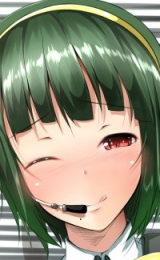
I have an image that I want to use as my avatar, the image is 363 x 360.
When I try the re-size it, I can't use the full image, only like half of it.
I wish to use the full size image as my avatar without having my image/re-sized or manipulated in some other way.
I've attached the image.
When I try the re-size it, I can't use the full image, only like half of it.
I wish to use the full size image as my avatar without having my image/re-sized or manipulated in some other way.
I've attached the image.
0
Cinia Pacifica
Ojou-sama Writer

0080900 wrote...
I wish to use the full size image as my avatar without having my image/re-sized or manipulated in some other way.You can only crop out about 160 X 260 of a pic which is larger than that size.

0
That limit is quite enough.
But since the avatar you want to use is mostly white, you should just stretch the upper border until you get the correct dimensions, I've done that countless times.
But since the avatar you want to use is mostly white, you should just stretch the upper border until you get the correct dimensions, I've done that countless times.
0
Open the picture with a program like mspaint. then add a large portion of blank white space around the image. that way, the image can be cropped in the blank portion instead of on the pic itself.
0
animefreak_usa
Child of Samael

Even though you can add more space you still can restrict it to 150x250 and still get all the info.. best you can to resize it smaller 150 x 250 or less or free transform and skew the perception.
 150x180
 150 x 250
150x180 150 x 250
0
 here.
here.like this. you will have some blank space at the bottom of the avatar, but now you can get the whole pic part in with out distortion.
i made it fit.

0
I was out for the rest of the day yesterday, so I couldn't monitor/keep track of the replies and support.
Thanks for the help & support everyone. :)
Thanks for the help & support everyone. :)
0
My avatar won't change... When I go to the profile, it lets me choose a picture and everything, but when I Submit, it sends me back to my profile with the old avatar. Is anyone else having this problem?
0
Red Vodka wrote...
Had the same problem about a week ago. Haven't tried again to see if the problem's still there.Nevermind, the image was too big for the resize screen to work properly, so it didn't change it. I resized it in Paint, and it worked fine.