rokushou Posts

ProColognian wrote...
The best backup method is gettin' a file server (FTP recommended),savin' your precious files and schedule a backup operation for once a week,
lock it's rack in a locker,
and let the server run FOREVER. (shuttin' down makes ugly entries in logfiles and servers aren't produced to be shut down)
Why server?
'Cuz it's just cool to have an own server.
For residences outside European Union:
As long as nuclear power plants will not be abolished, you don't need to worry
about the electricity bill.
Damn right.
Power here in Australia is fair cheap but the fucking government want green solution to replace the coal powerplants we got here though they produce only a fraction of the power an average coal power plant or nuclear can crank out.
If you're building a server for file purposes and nothing more look for a decent sound deadened case and get some good quiet fans on there (Noctua comes to mind).
StaticChange wrote...
Personally, I'd just get an internal drive... but thats just me. I guess external drives can be convienient when you want to take your movies to a friends house, but they are more finicky too. The NTFS file system wasn't really designed for external drives either. This isn't a huge issue tho, just remember to goto 'safely remove hardware' before unplugging your external if it uses NTFS.If you wanted an even more secure method of backing up your files, you could get two drives and put them in raid 1. You'd have to use internal drives though, and you'd lose half the total space. But this is just about the most secure method.
One of the rules of backing up data is that you don't have it in the same place so that in case of a catastrophic loss of data you have a backup somewhere in this case putting another drive in the computer just means if something goes pear-shaped there's a good chance of you losing the backed up data.
External drives are good but they're also susceptible to failure as hard drives are mechanical devices.
Personally if you have the money get a NAS (network attached storage) box like Tranquility said, make sure it's capable of running RAID 1 so that your backups have a backup on the NAS itself.
shotgunorg wrote...
spectre257 wrote...
shotgunorg wrote...
zelgadis123 wrote...
mibuchiha wrote...
So which one has better value overall? I'm planning to buy so this thread can help a lot.For now if you thinking of buying nvidia, try to avoid cards with the g92 or G94
Heres the link
http://www.engadget.com/2008/08/12/nvidia-g92-and-g94-gpus-failing-too/
Nothing is absolute, b/c Nvidia been hush, hush about it for financial reasons, but I would try to avoid them even if the price is right. Maybe I would go ATI for this purpose?
Note: I have had a Nvidia 9600 GT for more than a year, I hope I am not going to run in any problems in the future.
I think you won't for 2-3 more years. I won't either, until I find that a fair amount of the games I have can't run on High settings. Then I'm going to get a new one (probably 2 for SLI reasons)
SLI ain't worth it imo you're better off getting a better mid range card.
SLI is worth every Centavo and Peso I feed my computer, I've tried SLI on a friends computer and it was a blast (yeah Crysis on Max with a 120 plus FPS)
Depends on the hardware that's running mate.
The only place you'll benefit really from multi card setups is high resolution gaming meaning 1920x1080 and up.
Triple monitor setups are where your multi-card setups can really shine and if you intend to do that power to you but otherwise it's a white elephant of a purchase.
Don't forget you need a fast cpu to not bottleneck the video cards.
Here's Left 4 Dead running off my 4870, admitantly I had to lessen AA a bit but otherwise it ran like a dream.
Excellent theoretical speeds won't hit such speeds thanks to controller limitations.
Never-the-less a great jump for USB.
But it won't achieve speeds that SATA2 and SCSI can achieve.
Caddies ftw.
Never-the-less a great jump for USB.
But it won't achieve speeds that SATA2 and SCSI can achieve.
Caddies ftw.
shotgunorg wrote...
zelgadis123 wrote...
mibuchiha wrote...
So which one has better value overall? I'm planning to buy so this thread can help a lot.For now if you thinking of buying nvidia, try to avoid cards with the g92 or G94
Heres the link
http://www.engadget.com/2008/08/12/nvidia-g92-and-g94-gpus-failing-too/
Nothing is absolute, b/c Nvidia been hush, hush about it for financial reasons, but I would try to avoid them even if the price is right. Maybe I would go ATI for this purpose?
Note: I have had a Nvidia 9600 GT for more than a year, I hope I am not going to run in any problems in the future.
I think you won't for 2-3 more years. I won't either, until I find that a fair amount of the games I have can't run on High settings. Then I'm going to get a new one (probably 2 for SLI reasons)
SLI ain't worth it imo you're better off getting a better mid range card.
zelgadis123 wrote...
From what I seen, Nvidia have had selective quality control problems on certain GPU lines. Example include the 8400 labtop gpu products that were included in older Macbook and Dell labtop lines. You can google it and it will find plenty of information b/c it is/was a big deal, with Apple threatening to dump Nvidia for quality control issues in its nvidia powered Mac Books.Another maybe important thing to note, is the fact that Nvidia is consistently better than ATI when it comes to driver updates and support. That means if you have a specific software bug with a specific game, graphics card line; it will be addressed quickly if you go nvidia, but if you ATI you will have to wait if it ever comes.
If I'm not mistaken it wasn't a quality control problem for the 8400 laptop series it was a design flaw that caused certain parts to overheat and eventually fail.
I reckon Nvidia doesn't update their drivers as regularly as Nvidia though I do find Nvidia's drivers less quirky.
ATI's a bit all over the shop with their drivers the latest update completely changed the UI but it's still good though.
Shawn2005x wrote...
Hey panda I'd go for the direct connect its easier cheaper and alot less hassle also i heard that the xbox live wireless has random D/C's so went for the cable unfortunately i had to get a 35ft ethernet cable <---fail....but it works.Lol I have to agree wireless is rather sketchy but then again I have a mate who uses wireless and it runs a-okay.
mibuchiha wrote...
skoodlez13 wrote...
Nvidia = expensive but very awesome performance powerATI= not so expensive but average/high performance power
So which one has better value overall? I'm planning to buy so this thread can help a lot.
ATI is more bang for buck imo.
Nvidia has a premium but you do get that extra performance it just comes at a cost their 250/260 (low-mid) range is quite good, go for the 275 (mid-high) if you have that extra buck and 295 if you have money to burn and want an epeen extention.
Otherwise if you want to go with ATI I recommend 4770 or 4850 for low-mid end and 4870 or 4890 for mid-high end, if you're feeling flush get the 4870X2 or hold out to see what the 5xxx gen cards have to offer.
If you play games, the resolution you play at will determine your card choice as there's no point getting a 4870X2 if you're going to be playing at 1680x1050 (except for more epeen), when a 4870 handles modern games just fine and can handle Crysis on high with AA.
If you plan to play from 1920x1200 upwards go no lower than a 4890 or a 275 anything lower will result in chug or having to lower your detail levels.
Anyway I was into the whole video card wars but I'm pretty much over it just because a card can do 2fps more but costs an extra 200 bucks just isn't worth it and realisticly you won't see the difference in performance.
SLI and Crossfire are overrated as sticking two low end cards together is as expensive as buying an equivalent card higher up on the scale which performs better than the two cards together most of the time.
But as an epeen extention look no further SLI/CF two beefy cards and make those internets kiddies get flustered.
There is an exception though if you plan on playing with three monitors and up go for SLI/CF just don't forget to buy a Matrox Triple Head 2 Go Digital Edition as it's the only way to use SLI/CF in multi-monitor mode, unfortunately SoftTH as of right now does not support SLI/CF so no having to pay 600 bucks for a TH2G.
Oh well that's my 2 cents.
I just hope this thread will be a level headed discussion instead of a fanboy flame war.
TehMikuruSlave wrote...
Isn't $800 aus like $1500 usd? If so, I bought a stronger computer for $1000...EDIT: I was thinking of NZ dollars, I suppose that's a good price. I'd get a better processor and Os, but hey, that's just me.
EDIT2: What the fuck, it comes installed with 32bit but the disk for 64? Well fuck, just use the disk to format and install 64bit right away and you're set for the month until Win7 is released.
EDIT3(LOL): Get a blue-ray drive. Seriously.
There's no point installing a 64bit operating system when you're not going to take advantage of it or have apps that require it.
Next bluray isn't a necessity it's completely optional, imo a ps3/slim is a better alternative to getting a built in bluray burner for your computer.
The burnable discs themselves cost way more per gig than just buying a cheap 1Tb hard drive to back stuff up on.
OP doesn't need a better processor I reckon he'd want a better video card 250/260 or 4770/4850 would do him fine.
Maxiart wrote...
KURO L LAWLIET wrote...
It has a really strange problemI can connect to some Wireless Connection but it keep saying it can't find a server
Thats sound more like the computer keeps working offline even when it connects. Try this: Start the msn and sign in. If it fails to connect, click the options that looks more like 'fix problems' or whatever.
Works for me everytime something like that happens
Also check if your browser hasn't set itself to Offline mode.
For Firefox: File > Work Offline
Internet Explorer 8: Tools > Work Offline
Make sure those settings aren't checked.
KURO L LAWLIET wrote...
It has a really strange problemI can connect to some Wireless Connection but it keep saying it can't find a server
Okay that means your laptop isn't actually broken, it's more likely to do with your router.
First try power cycling the router this usually fixes most connectivity issues.
If that doesn't work, check if the router you're connecting to can actually hook into the internet, if you can physically access to the router try plugging a normal ethernet cable to see if you can access the internet.
Or if it's a uni internet connection you have the right proxy settings ect.
Maxiart wrote...
What do you mean the system is broken? It wont boot? Freezes? Perhaps there are better alternatives to formating, specially since its not guaranteed to work, as Imperial said.^^ QFT
You've got to see if you can fix the problem instead of just nuking your computer when things go wrong.
LibelloMello wrote...
hungryhippo247 wrote...
†¢ Windows Vista® Home Premium 32 Bit incl. Service Pack 1 with new Media Center interface
Get rid of vista and install another OS and you got a better comp.
Sounds like a good computer, haven't heard of the graph card though, so I'm not sure what to say about that. But if you want a good one, buy one of the 9000 GTX series - they're awesome.
Humm humm.. 800Aus Dollars, eh? Lemme check how much that is.. Well I'll be damned. That's a cheap computer, mate. Def worth it.
+1 to this but hold out till you can get windows 7
hungryhippo247 wrote...
lazyasschillypepper wrote...
Why did you remove the price tag? It was 800 something Australian dollars.Sorry. I didn't want to reveal the price before I got some replies.
Doesn't work very well when you do that mate.
A good pc is usually the balance of how much you pay for what you get.
And for 800 bucks that machine is bad.
The video card won't let you game if you plan to play new titles, the cpu is fine but you're paying way too much for too little.
Can't tell you if it's a good pc without your budget mate.
Here's a decent box you can build for around 1kAUD:
E8400 $195
Gigabyte EG31M-S2 $80
4GB DDR2 800 $70.95
ATI 4770/Nvidia 250 $128.99/$149 (1GB model)
500 GB Samsung $65
1TB Samsung$85.00
Corsair HX520 $132.00
Antec P183 $205.70
$962.64 (ATI Card)/ $982.65 (Nvidia Card)
This system will run most modern games without issues at 1680x1050 unless you want to play at 1920x1200 up I'd suggest shelling out for a Nvidia GT275 or a ATI HD4890.
You've probably noticed how I've put two hard drives my reasoning for this is that the 500gb samsung isn't a 'green' drive so it spins faster and has overall better access/load speeds so booting won't be such a pain, use 1TB green drives as storage not boot/system drives.
Here's a decent box you can build for around 1kAUD:
E8400 $195
Gigabyte EG31M-S2 $80
4GB DDR2 800 $70.95
ATI 4770/Nvidia 250 $128.99/$149 (1GB model)
500 GB Samsung $65
1TB Samsung$85.00
Corsair HX520 $132.00
Antec P183 $205.70
$962.64 (ATI Card)/ $982.65 (Nvidia Card)
This system will run most modern games without issues at 1680x1050 unless you want to play at 1920x1200 up I'd suggest shelling out for a Nvidia GT275 or a ATI HD4890.
You've probably noticed how I've put two hard drives my reasoning for this is that the 500gb samsung isn't a 'green' drive so it spins faster and has overall better access/load speeds so booting won't be such a pain, use 1TB green drives as storage not boot/system drives.
Varuna wrote...
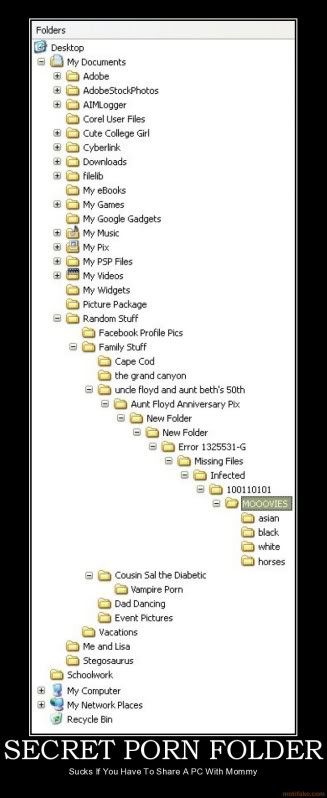
I used to hide my hentai folders deep down into my system32 folder where no one would even look, lol...But the hiding folder option is always a good nifty strategy. Actually, that's what my cousin did all the time. Made folders all over the fakku place and hid them.
Really annoyed me.
Umm I just hope you don't delete something by accident thereby breaking windows.
Hiding shit in System32 is plain silly.