[Mediafire/Torrent] Galaxy Angel
0
Kaimax
Best Master-San

@Raveboys: Change your Unicode settings to Japanese or use Applocale
lol, You think this Galaxy angel is hard? wait till you play Eternal Lovers and get to the mission where you will lose something very dear to you.
lol, You think this Galaxy angel is hard? wait till you play Eternal Lovers and get to the mission where you will lose something very dear to you.
0

Dude.
...Really?
I refuse to believe a Broccoli product ends in anything other then pure, sugary happy-happy.
...Really?
I refuse to believe a Broccoli product ends in anything other then pure, sugary happy-happy.
0

Kaimax wrote...
@Raveboys: Change your Unicode settings to Japanese or use ApplocaleUm, for future reference in case I run into the same problem, how do I "Change your Unicode settings to Japanese"? And What is Applocale? BTW, my OS is XP.
1

rober2 wrote...
Kaimax wrote...
@Raveboys: Change your Unicode settings to Japanese or use ApplocaleUm, for future reference in case I run into the same problem, how do I "Change your Unicode settings to Japanese"? And What is Applocale? BTW, my OS is XP.
For a guide to change your unicode settings to japanese, go here:
https://www.fakku.net/viewtopic.php?t=15462
Scroll down and you'll find a guide on how to do it.
Info on AppLocale
http://en.wikipedia.org/wiki/AppLocale
0
I see.
So is AppLocale or changing my unicode settings to Japanese required to install this game? Or is it just recommended? So far, I've been able to successfully install games without doing the said instructions...
All I know is that changing the unicode settings would enable me to see the symbols as japanese text. Does changing the unicode settings do other things?
So is AppLocale or changing my unicode settings to Japanese required to install this game? Or is it just recommended? So far, I've been able to successfully install games without doing the said instructions...
All I know is that changing the unicode settings would enable me to see the symbols as japanese text. Does changing the unicode settings do other things?
0
Kaimax
Best Master-San
Arizth wrote...
Dude....Really?
I refuse to believe a Broccoli product ends in anything other then pure, sugary happy-happy.
Lol, that sad part only lasts for 2-3 missions though. :D
0
*Fak_ku* wrote...
rober2 wrote...
Kaimax wrote...
@Raveboys: Change your Unicode settings to Japanese or use ApplocaleUm, for future reference in case I run into the same problem, how do I "Change your Unicode settings to Japanese"? And What is Applocale? BTW, my OS is XP.
For a guide to change your unicode settings to japanese, go here:
https://www.fakku.net/viewtopic.php?t=15462
Scroll down and you'll find a guide on how to do it.
Info on AppLocale
http://en.wikipedia.org/wiki/AppLocale
Hey, thanks alot. now it's work perfectly
0
rober2 wrote...
I see.So is AppLocale or changing my unicode settings to Japanese required to install this game? Or is it just recommended? So far, I've been able to successfully install games without doing the said instructions...
All I know is that changing the unicode settings would enable me to see the symbols as japanese text. Does changing the unicode settings do other things?
You've been able to install games without changing your unicode settings? Well, guess some games don't need it but the ones I've played always encountered an error during the install if I didn't change it. If you say you've installed games without it before, then it may not be needed for some but I reccomend doing it just in case you decide to play other games.
0
RaveBoys wrote...
btw, can this game run in window mode?yes.
First, DL this.
After unraring it, you'll find a Readme. in it, contains the instructions you'll need, including playing it in Window mode.
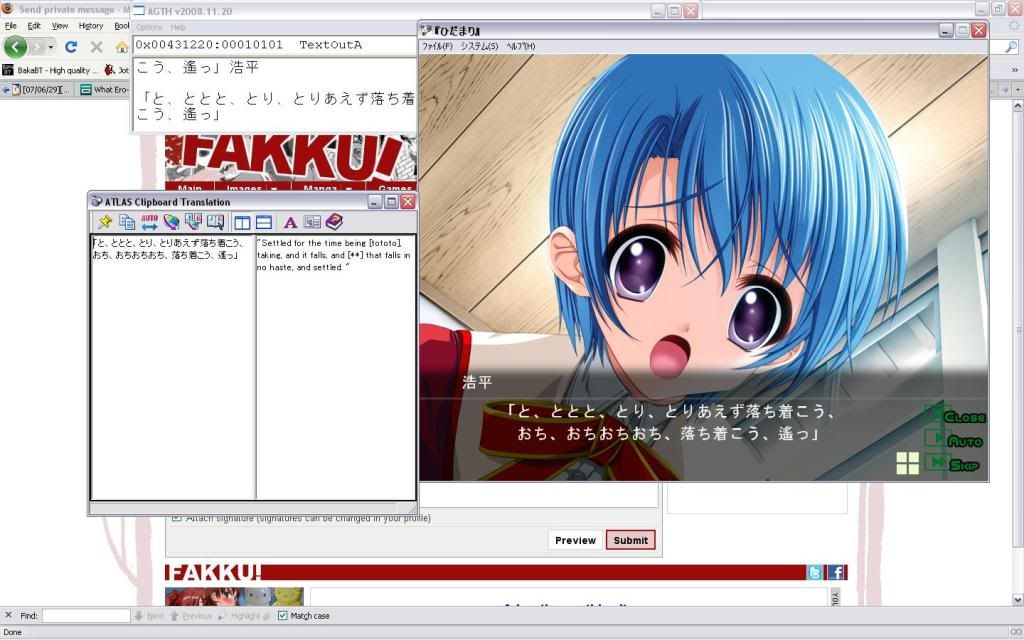
Oh, since you're now able to play the game, could you tell me how to properly install this? Which of these should I pick?
0
Kaimax
Best Master-San
rober2 wrote...
Oh, since you're now able to play the game, could you tell me how to properly install this? Which of these should I pick?
You won't be able to play if:
1. You don't install the East Asian language pack
2. You didn't change your unicode settings
0
Kaimax wrote...
rober2 wrote...
Oh, since you're now able to play the game, could you tell me how to properly install this? Which of these should I pick?
You won't be able to play if:
1. You don't install the East Asian language pack
2. You didn't change your unicode settings
I think you won't be able to INSTALL... Well, you're right... I ran into the same problem as Raveboys...
So let's say I have AppLocale, what do I do next? I have no clue as to how to use this darn software.
0

to keep everything simple: change your language for non-unicode programs to japanese. there are cases when applocale doesn't work.
also, the way to operate applocale (in case anyone is wondering) is extremely simple. just pick the .exe to run and choose the 'language environment' to run the .exe in, in this case: 日本語
in fact, most of the things you need to do to get games working are listed in the 'FAQs and Tutorials for Game Uploads'<-stickied on this section (Visual Novels, Doujin Soft, and Eroge) of the forum
very convenient
also, the way to operate applocale (in case anyone is wondering) is extremely simple. just pick the .exe to run and choose the 'language environment' to run the .exe in, in this case: 日本語
in fact, most of the things you need to do to get games working are listed in the 'FAQs and Tutorials for Game Uploads'<-stickied on this section (Visual Novels, Doujin Soft, and Eroge) of the forum
very convenient
0
chaosbreak wrote...
to keep everything simple: change your language for non-unicode programs to japanese. there are cases when applocale doesn't work.also, the way to operate applocale (in case anyone is wondering) is extremely simple. just pick the .exe to run and choose the 'language environment' to run the .exe in, in this case: 日本語
in fact, most of the things you need to do to get games working are listed in the 'FAQs and Tutorials for Game Uploads'<-stickied on this section (Visual Novels, Doujin Soft, and Eroge) of the forum
very convenient
Guess what. I've been there. And convenient isn't really the right word here...
I can't change the language for non-unicode programs to japanese. I'm yet to install it... Although I could get the necessary software to install the japanese Unicode, Megaupload is being a bitch and won't let me DL it... yet.
If you could give an idiot like me a simple step-by-step method on how to get this done after I've gotten the necessary software, that would be appreciated.
and although I can believe you that AppLocale may not always work, I didn't even understand your explanation of how to use it. Like I said, a step-by-step explanation would be nice...
Oh, And I'm running with XP.
Edit: For reference, this is the File I'm DLing (MU finally decided to let me DL it) as well as the instructions found in this thread.
Avraham posted this in the games section wrote...
i found a Japanese locale files pack!!Instructions(since original are Italian):
1. Download the "Japanese-Pack-XP.rar" from here www.megaupload.com/es/?d=5CN4SYU8
2. Extract "Japanese-Pack-XP.rar" to a folder of your choosing (preferably desktop)
3. Go to Control Panel-->Regional and Language Options
4. Under the "Languages" tab tic the "Install files for East Asian Languages"
5. Click Apply, on the insert cd message click ok and the it'll give you the same error BUT with the option to choose where to load the files from
6. go to .../Japanese-Pack-XP/i386/Lang and load the only file that appears (only one appears because it asks for a specific file)
7. sit back and watch it install
8. it doesn't matter as long as you eventually restart, not log off/standby/hibernate.
i was tired of people crying that it dosen't work for them so i hope that at least those who care enaugh will find this post and make good use of it
credits
to the one who uploade the video
me for instructions and for actually bothering to search it and post it here.
0
i am not kidding when i say that applocale is easy to use.
there are 2 steps involved(in this order):
1)picking a .exe file you wish to run
2)selecting the language you want to run the program in
...i can't really split this up into smaller steps?
i can't help for the language pack files you downloaded since i installed mine from the window xp disc.
try applocale for now and hope that it works lol
there are 2 steps involved(in this order):
1)picking a .exe file you wish to run
2)selecting the language you want to run the program in
...i can't really split this up into smaller steps?
i can't help for the language pack files you downloaded since i installed mine from the window xp disc.
try applocale for now and hope that it works lol
0
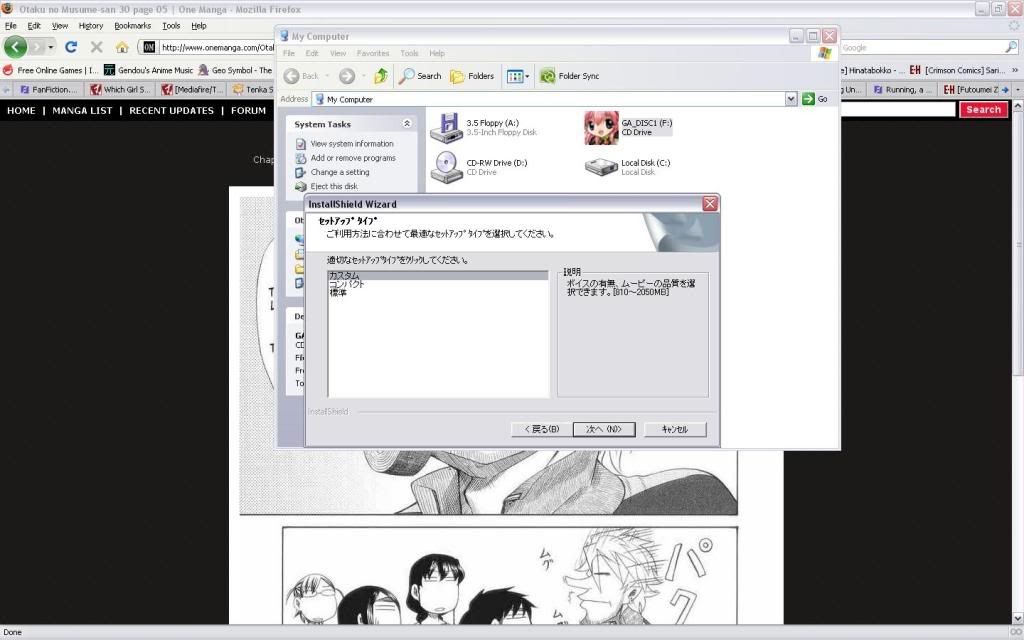
When I finally managed to make it turn into this...
My mind went like this
now, one more problem blocks my path towards GA goodness.
this...
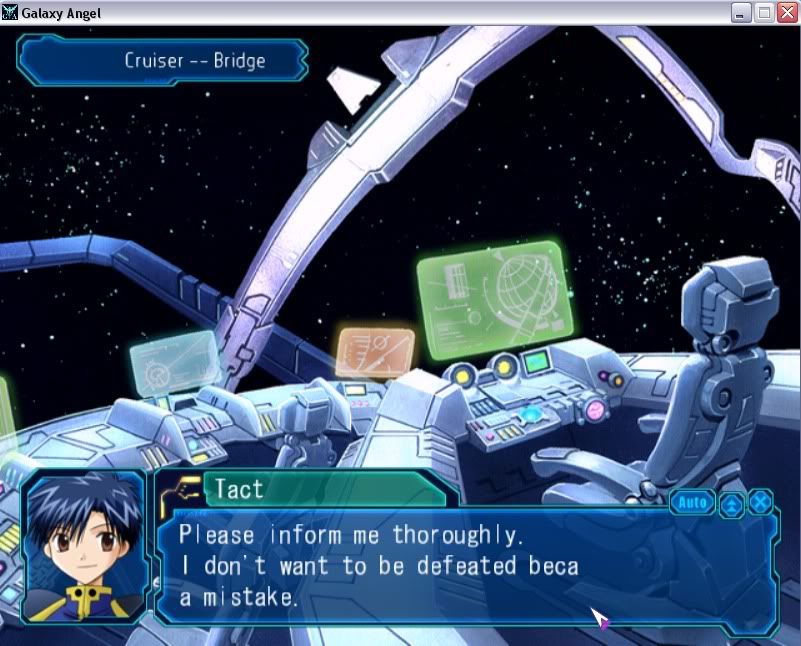
If you haven't noticed, the second line saying "I don't want to be defeated beca" is the give away... As you may have noticed... something is keeping the rest of the text from appearing. Obviously that would've been the word "because".
This doesn't just apply to this one part, in fact it applies to all. I'm guessing you know what I'm talking about... So... what do I have to do to show all the text?
My mind went like this
now, one more problem blocks my path towards GA goodness.
this...
If you haven't noticed, the second line saying "I don't want to be defeated beca" is the give away... As you may have noticed... something is keeping the rest of the text from appearing. Obviously that would've been the word "because".
This doesn't just apply to this one part, in fact it applies to all. I'm guessing you know what I'm talking about... So... what do I have to do to show all the text?
0
rober2 wrote...
If you haven't noticed, the second line saying "I don't want to be defeated beca" is the give away... As you may have noticed... something is keeping the rest of the text from appearing. Obviously that would've been the word "because".
This doesn't just apply to this one part, in fact it applies to all. I'm guessing you know what I'm talking about... So... what do I have to do to show all the text?
Either click it or set the text speed to fast, no other solution so far.
0
haxbbq wrote...
rober2 wrote...
If you haven't noticed, the second line saying "I don't want to be defeated beca" is the give away... As you may have noticed... something is keeping the rest of the text from appearing. Obviously that would've been the word "because".
This doesn't just apply to this one part, in fact it applies to all. I'm guessing you know what I'm talking about... So... what do I have to do to show all the text?
Either click it or set the text speed to fast, no other solution so far.
Yeah, I already tried that, but didn't do the trick.
Eventually, I found the problem, and it was regarding the translated patch... I must've made a mistake with installing it... It's fine now...
And now for the last question (thanks to those who've bared with me so far. (if you've noticed, I've been bugging this thread since page 2 due to my lack of knowledge AKA stupidity.)
Can I just copy-paste the installed files into an external hard drive so that I don't have to install this game? Or is installation REALLY necessary for me to play this in case I "remove" this game?
This question is for back up purposes.
0
finnaly finished Milfeulle route, 4 more to go
the battle 10 is pretty awful right?
If you haven't noticed, the second line saying "I don't want to be defeated beca" is the give away... As you may have noticed... something is keeping the rest of the text from appearing. Obviously that would've been the word "because".
This doesn't just apply to this one part, in fact it applies to all. I'm guessing you know what I'm talking about... So... what do I have to do to show all the text?
Either click it or set the text speed to fast, no other solution so far.
Yeah, I already tried that, but didn't do the trick.
Eventually, I found the problem, and it was regarding the translated patch... I must've made a mistake with installing it... It's fine now...
And now for the last question (thanks to those who've bared with me so far. (if you've noticed, I've been bugging this thread since page 2 due to my lack of knowledge AKA stupidity.)
Can I just copy-paste the installed files into an external hard drive so that I don't have to install this game? Or is installation REALLY necessary for me to play this in case I "remove" this game?
This question is for back up purposes.
can't you just uninstal it from add/remove prog in windows?
the battle 10 is pretty awful right?
rober2 wrote...
haxbbq wrote...
rober2 wrote...
If you haven't noticed, the second line saying "I don't want to be defeated beca" is the give away... As you may have noticed... something is keeping the rest of the text from appearing. Obviously that would've been the word "because".
This doesn't just apply to this one part, in fact it applies to all. I'm guessing you know what I'm talking about... So... what do I have to do to show all the text?
Either click it or set the text speed to fast, no other solution so far.
Yeah, I already tried that, but didn't do the trick.
Eventually, I found the problem, and it was regarding the translated patch... I must've made a mistake with installing it... It's fine now...
And now for the last question (thanks to those who've bared with me so far. (if you've noticed, I've been bugging this thread since page 2 due to my lack of knowledge AKA stupidity.)
Can I just copy-paste the installed files into an external hard drive so that I don't have to install this game? Or is installation REALLY necessary for me to play this in case I "remove" this game?
This question is for back up purposes.
can't you just uninstal it from add/remove prog in windows?
0
RaveBoys wrote...
Spoiler:
I meant in case I have to REINSTALL the game.
if, for say, I copy the game folder into my external hard drive, could I just copy-paste the game folder into my computer in case my machine would need reformatting? or is installation the only way?
I know you could just copy-paste a game without installing it... but this doesn't apply to other games, so I'm just asking to make sure.
![[Mediafire/Torrent] Galaxy Angel - Page 3 - Page 3 - Page 3 - Page 3 - Page 3 - Page 3 - Page 3 - Page 3 - Page 3 - Page 3 - Page 3](https://img.fakku.net/BS-j1CH1ws6pz5Tv43P4c1Peh_SiaRopjJGwV60UuUg/w:1200/h:630/rt:auto/g:sm/f:jpg/aHR0cHM6Ly93d3cuZmFra3UubmV0L2FwaS9vZy91bmxpbWl0ZWQ_dD0xNzY0NjA0ODAw.jpg)